Quick answer: the best AI tools for students
The best AI tools for students in 2026 are not only chatbots. The most useful ones do one job well: they turn your notes into quizzes, find real studies, transcribe lectures or show the steps of a maths problem. This guide covers 12 of them, grouped by task, with their free tiers and any student offers we found in recent guides. It is based on published plan details and independent reviews, not on our own testing.
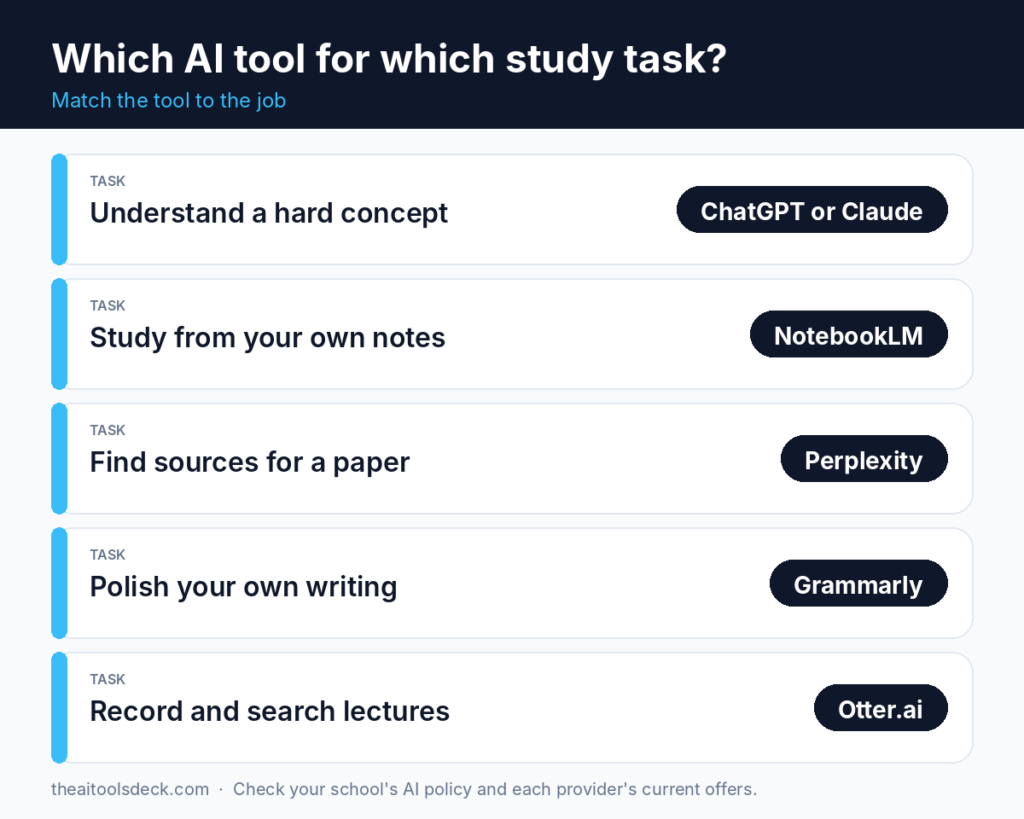
- Studying your own notes: NotebookLM, Quizlet or Anki.
- Finding and checking research: Consensus, SciSpace or Zotero.
- Writing: Grammarly.
- Lectures and organising: Otter.ai or Notion.
- Maths and science: Photomath or Wolfram Alpha.
- School-age learners: Khanmigo.
General chat assistants are covered separately. For ChatGPT, Claude, Gemini and Perplexity free plans, read our guide to the best free AI chatbots in 2026, and for paid plans see ChatGPT vs Claude vs Gemini.
How we picked these tools
We compared independent student guides published between May and October 2026. We chose tools that have a usable free tier, do a clear job, and are not just another chat window. We did not run our own benchmarks, so “best for” means the best match for a tool’s stated purpose.
Prices and limits in 2026 have changed several times, according to a July 2026 student guide. Treat every number here as a snapshot and confirm it on the provider’s own page.
The tools at a glance
| Tool | Best for | Free tier | Student angle |
|---|---|---|---|
| NotebookLM | Study guides from your own sources | 100 notebooks, 50 sources each | Google has run a student offer for AI plans |
| Quizlet | Flashcards, practice tests | Yes, with limits | Paid plan priced by region |
| Anki | Spaced-repetition flashcards | Free on desktop and Android | One-time fee on iPhone |
| Consensus | What peer-reviewed studies conclude | Limited monthly searches | Student discount on Pro |
| SciSpace | Explaining dense papers | Yes | Discount for verified students |
| Zotero | Citations and references | Free, open source | Extra cloud storage is paid |
| Grammarly | Grammar and clarity | Core checks, limited AI prompts | Student pricing varies |
| Otter.ai | Lecture transcripts | 300 minutes a month | Discount with .edu email |
| Notion | Notes and projects | Free, with AI credits metered | Free Education plan |
| Photomath | Camera-based maths steps | Most step-by-step solutions | None listed |
| Wolfram Alpha | Checking maths and science | Basic answers | Verified student pricing |
| Khanmigo | Guided tutoring for school learners | Free for teachers | Paid for learners and parents |
Study tools: turn your notes into practice
NotebookLM
NotebookLM builds cited study guides, summaries and audio overviews from the documents you upload, so its answers stay tied to your own material. According to an October 2026 pricing breakdown, the free plan allows 100 notebooks with 50 sources each, and chats and overviews share one usage allowance that refreshes every five hours up to a weekly limit. Consumers cannot buy it on its own: higher limits come with Google’s AI plans.
The same source reports that eligible college students can get 12 months of Google’s AI Pro in the US, or AI Plus in 140+ other markets, if they redeem by December 31, 2026. It requires identity verification and a payment method, and it renews at the paid price after the free year. Check Google’s student page for your country before you sign up.
Quizlet and Anki
Quizlet is the easiest way to make flashcards and practice tests, and its large library of shared sets saves time. Free use has limits on practice tests, and the paid plan’s price varies by region and promotion, per an October 2026 study-tool comparison. Anki suits students who want control and spaced repetition: it is free on desktop and Android, and the iPhone app is a one-time purchase.
Research tools: find real sources
- Consensus: searches peer-reviewed studies and summarises what they conclude. A July 2026 guide lists a free tier with a small number of Pro messages and Deep Searches a month, plus a student discount on Pro.
- SciSpace: explains dense academic papers in plain language. It has a free tier and a discount for verified students and academics.
- Zotero: stores sources and builds bibliographies. It is free and open source, and extra cloud storage is paid.
AI research tools can summarise a paper wrongly or cite a study that does not say what the summary claims. Open the original paper before you quote it.
Writing, notes and lectures
- Grammarly: checks grammar, clarity and tone before you submit. The free plan includes core checks and a limited number of AI prompts each month, per the July 2026 guide. Use it to polish your own writing.
- Otter.ai: transcribes and summarises lectures. The free plan gives 300 minutes a month with a 30-minute limit per recording, and a discount with a .edu email is reported.
- Notion: organises notes, schedules and group projects. Verified students can get a free Education plan. Confirm which AI features are included, because AI use is metered.
Maths and school-age learners
- Photomath: shows step-by-step solutions from a photo. Most solutions are free, and deeper help is paid.
- Wolfram Alpha: checks maths and science answers. Basic answers are free, and verified student pricing exists on Pro.
- Khanmigo: guides younger learners through problems with questions instead of answers. It is free for teachers and paid for learners and parents, at about $4 a month or $44 a year in the October 2026 comparison.
Use AI without breaking school rules
Rules differ by school and even by course. A few habits keep you safe:
- Read your course policy first. If it is unclear, ask your instructor.
- Use AI to understand, not to submit. Quizzes, explanations and feedback are safer than pasted answers.
- Verify facts and citations. AI tools can state wrong facts or invent sources with confidence.
- Keep your own voice. Write the draft yourself, then polish it.
- Protect your data. Do not paste private or confidential material into free tools.
Frequently asked questions
What are the best free AI tools for students?
NotebookLM for studying your own notes, Zotero for citations, Anki for flashcards and Otter.ai for lectures all have useful free tiers. Pick by task, then try one on a real assignment.
Can I use AI for homework?
Only if your school or instructor allows it. Many schools accept AI for studying and feedback but not for submitted work. Check your policy.
Do students get discounts on AI tools?
Some providers offer student pricing or free access after verification, but offers change, have deadlines and depend on your country. Confirm on each provider’s page.
Which AI tool helps most with research papers?
Consensus and SciSpace help you find and understand studies, and Zotero manages your citations. Always read the original source.
Are AI answers always correct?
No. Verify names, numbers, quotes and citations against the original source, especially for exams and research papers.
Do you test these tools yourselves?
This guide summarises public plan details and independent guides. It is not a hands-on benchmark, and plans change.
Sources and method
Information compiled on November 4, 2026 from independent guides, including Fello AI on NotebookLM (October 22, 2026), Fora Soft study tools (October 10, 2026), Rework student guide (July 16, 2026) and Fast.io (May 12, 2026). Offers and limits change often, so confirm them on each provider’s own site.
Disclosure: some links on The AI Tools Deck may be affiliate links. If you sign up through them we may earn a commission at no extra cost to you. It never changes our recommendations. See our affiliate disclosure.